




Get Ready for Your Next Interview
Practice with an AI coach who asks real interview questions. Get real-time hints from the Chrome extension — just like in a real interview.
Visual AI avatars are in beta. Some sessions may use voice-only coaching — same great interview practice, just without the visual avatar.
Get your first hint — about a minute
Only signing in needs Chrome’s puzzle menu — the rest happens in your call tab, and nothing is recorded until you press the button in step 4.
- 1Add JobLander to Chrome — it takes one click and you can do the rest straight away.
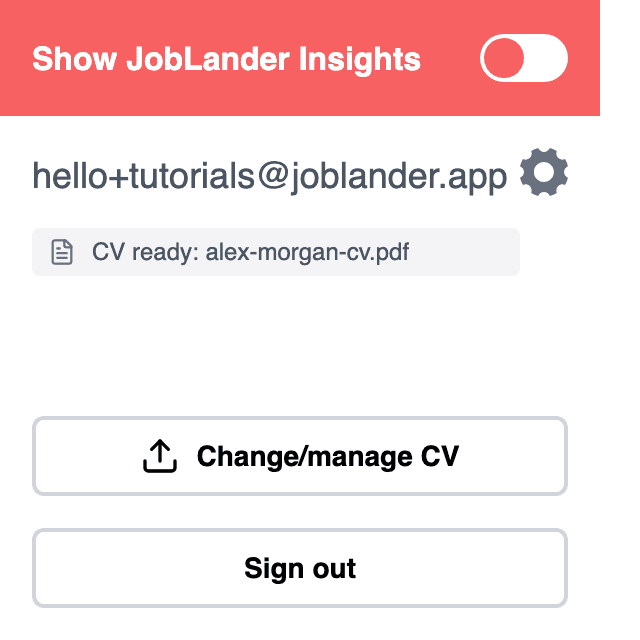
- 2Sign in to JobLander once: open it from the puzzle-piece menu at the top right of Chrome and use the same account as here. If it already shows your email, skip ahead.
- 3Open the call tab — Google Meet, Zoom or Microsoft Teams. If it was already open before you installed, reload it once.
- 4JobLander appears there and offers to turn hints on. Press it.
- 5Allow the microphone when Chrome asks.
- 6Say a question out loud, for example “Tell me about yourself”.
- 7Your first hint appears. When you are done, press End on the widget's timer and press it again to confirm — the session and the metering stop on that second press.
Nothing appeared on the page? Click the puzzle-piece icon at the top right of Chrome, pick JobLander, sign in with the same account, then switch on “Show JobLander Insights”.
Where you are
What JobLander can see about your setup from this page.
Extension installed
Nothing answered on this page. Either it is not installed, or this tab was open before you installed it — reload once, and install it if nothing changes.
Signed in to the extension
Not signed in yet, or the extension has not answered. Open JobLander from the puzzle-piece menu at the top right of Chrome and sign in with the account you use here.
The rest happens in your call tab, where this page cannot see it: open Google Meet, Zoom or Microsoft Teams, let JobLander turn on there, allow the microphone when Chrome asks, and say a question out loud.
Something not working?
The four places this usually goes wrong, and what fixes each.
›I can’t find the JobLander icon
Chrome hides new extensions behind the puzzle-piece icon at the top right. Click it, then JobLander; the pin next to it keeps the icon visible. On Chrome’s own pages — the New Tab page, settings — extensions do not run at all, so switch to an ordinary tab first.
›The extension won’t let me in
The extension signs in on its own, separately from this site. Use the same account in both, or the hints will not know your CV. If the popup shows a different email, sign out there and back in with the one you use here.
›I turned it on but nothing appears in the call
Chrome does not put JobLander into tabs that were already open when you installed or updated it. Reload the call tab once and turn it on again. Also check you are on the tab you turned it on for — it runs per tab.
›The panel is there but no hints come
Look at the two lamps in the panel header. The microphone one has to reach Active — if Chrome asked for the microphone and was refused, allow it and the lamp turns green. The meeting-audio one staying off is normal: that is Mirror mode, where JobLander answers your voice, so say the question out loud yourself. If your balance is at zero, a new session will not start.
Learn with Step-by-Step Tutorials
Follow our 8-tutorial course to master JobLander — from your first setup to advanced tips.
Getting live AI hints during your real interview
Set up JobLander in Google Meet, Zoom, or Teams to get real-time answers without breaking eye contact.
Safe Practice & Extension Check
Test your microphone and rehearse your answers with an AI Coach before the real interview.
Tips & Tricks: Practice with YouTube
Use JobLander with YouTube or podcasts to train with AI without the pressure of speaking.
How It Works
Install the Extension
Add JobLander to Chrome to get real-time hints during practice and real interviews.
Start a Practice Interview
Choose your AI coach and language. The coach will ask you real interview questions for your role.
Get Hints in Real Time
While you practice, the extension listens and shows AI-powered hints — helping you answer confidently.
How the Extension Works
The extension listens to the audio on the page and turns the conversation into hints — in a real video call or in a practice session.
Nobody speaking yet? JobLander listens to you instead — ask a question out loud and it answers. It switches back on its own as soon as the call has sound.
If you installed the extension during an active call, reload the page once for it to work properly.