
返回教程
2分钟阅读
回顾您的表现
查找转录记录,阅读AI简报,了解您的见解利用率分数以提升自己。
1
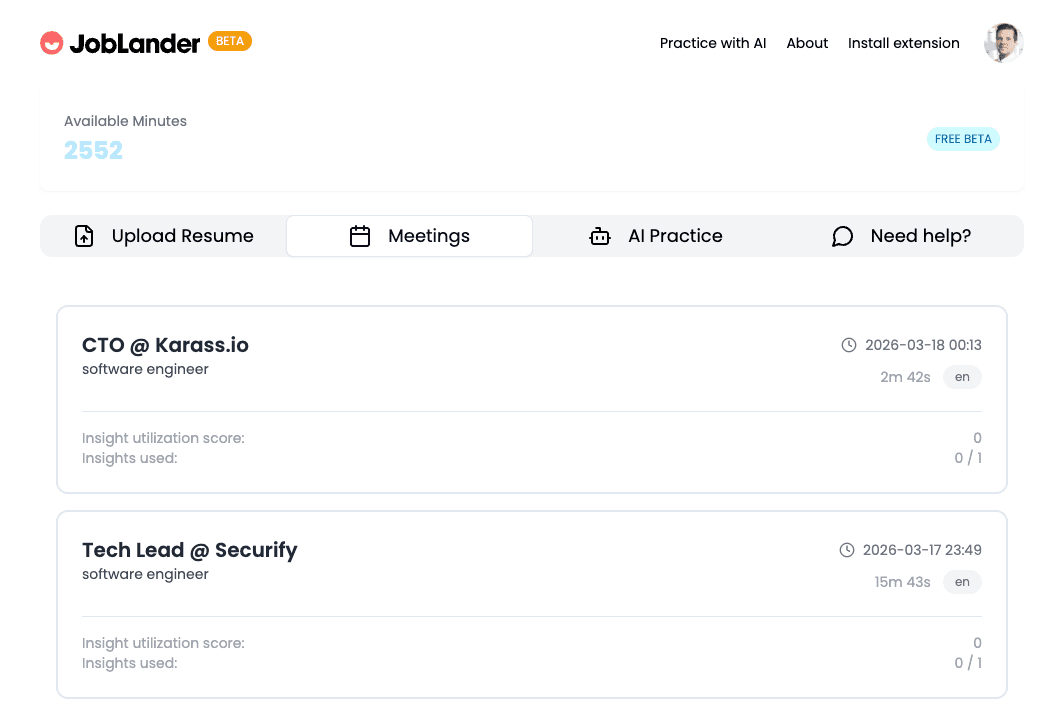
找到您的会议
- →前往仪表板,点击会议标签。
- →每张卡片显示日期、时长、角色和您的洞察利用率得分。
- →点击任意会议卡片打开详细回顾。
joblander.app/dashboard
2
阅读转录
- →转录按时间顺序显示完整对话。
- →切换显示洞察,将实时AI提示直接注入转录 — 精确查看哪些提示在何时显示。
- →切换显示时间戳,查看每句话的精确时间。
joblander.app/meetings/...
A
Tell me about a challenge you faced and how you handled it.
💡 Hint shown: Use STAR method — Situation, Task, Action, Result
At my last job, we had a critical production outage the night before launch…
Y
A
What's your greatest professional strength?
💡 Hint shown: Tie to resume — your TypeScript + system design experience
3
分析AI总结报告
- →洞察利用率得分(满分10分)衡量您在回答中有效使用AI提示的程度。
- →做得好的地方突出您最强的回答以及您向面试官传达的积极信号。
- →需要改进的地方针对您犯错或遗漏简历关键细节的领域提供有针对性的反馈。
joblander.app/meetings/...
✅ What went well
- • Strong use of STAR method in behavioral answers
- • Referenced specific resume experience in Q2
🔧 What to improve
- • Answer to Q3 was too long — aim for under 90 seconds
- • Missed opportunity to mention leadership in Q4
📈
跟踪您的长期进步
您回顾的面试越多,就越能清晰地看到规律——您始终表现出色的问题,以及多几次练习就会大有改变的领域。目标是每周将您的见解利用率分数提高一分。